1 min read
Asset register and repair requests
Assets & maintenance has the Asset register and Repair requests. Open repairs show on the dashboard under Needs attention, in red when one is Urgent.
- Who can do this
- Office admin, principal
- You need
- Assets & maintenance module (ask adimata to switch it on). Adding needs Edit; teachers have View by default, so they report repairs to the office unless the principal gives them Edit.
- Not your job? Pick your role →
Repair requests
adimata.com/schoolos/app/r/repairs
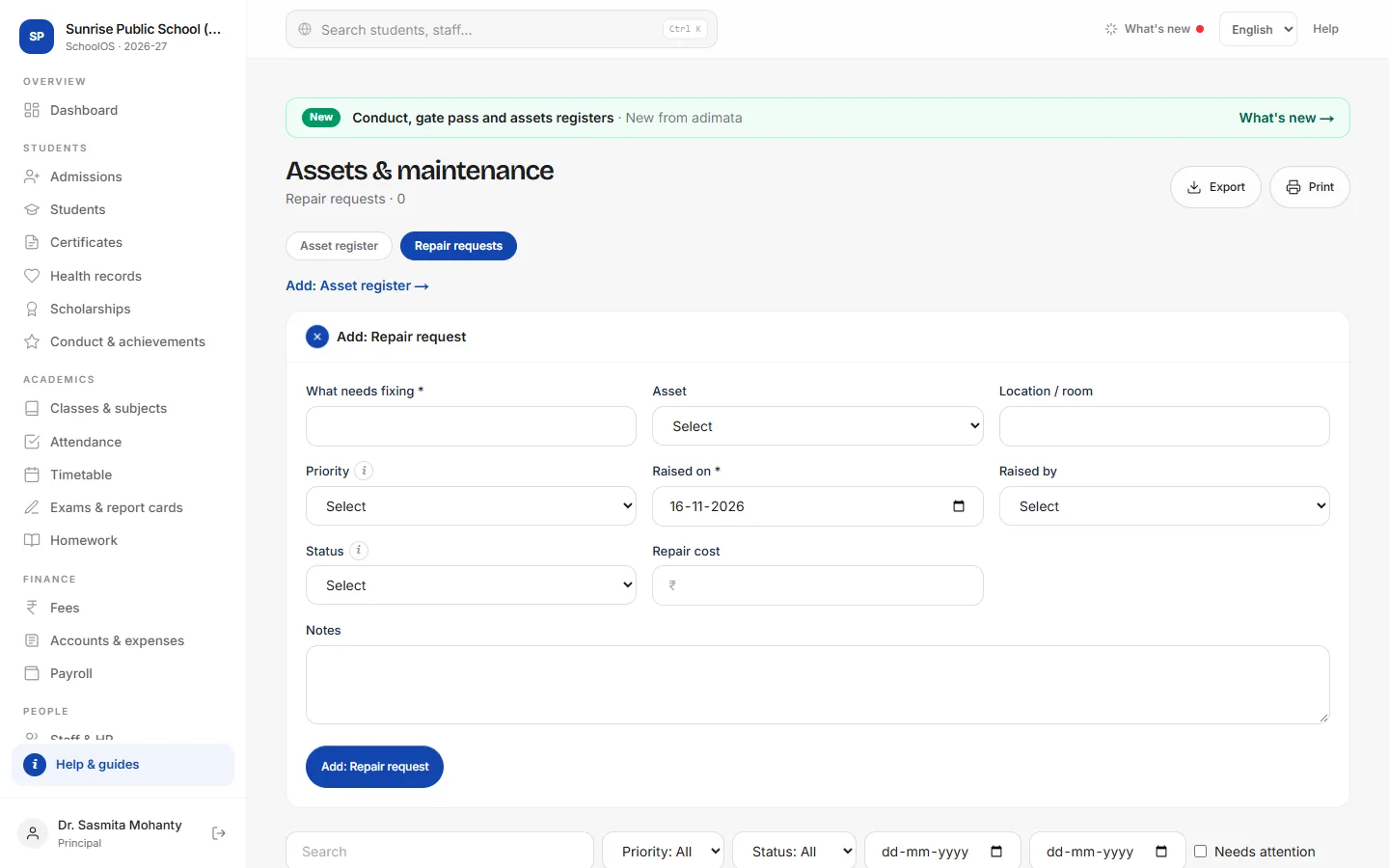
- 1Register assetsAsset register tab → Add: Asset: Asset, Asset tag / no., Category, Location / room, Quantity, Purchase cost, Purchased on, Condition and Warranty until.
- 2Raise a repairRepair requests → Add: Repair request: What needs fixing, Asset, Location / room, Priority (Urgent, Normal, Low), Raised on and Raised by.
- 3Close itWhen fixed, press Resolved, and fill Repair cost and Notes.
Common mistakes
- Leaving fixed repairs open: the dashboard keeps counting them.
Tips
- Use the same tag number painted on the item.
- Record the repair payment as an expense (Head Maintenance) in Accounts.
Problems and questions
Where do urgent repairs show?
On the dashboard under Needs attention, in red, for everyone who can see Assets & maintenance.