2 min read
School settings: profile, rules, fees and custom fields
School settings is one long form in five sections. Press Save settings at the bottom after any change; it applies at once for everyone. The school code at the top is what everyone types to sign in.
- Who can do this
- Principal
- You need
- School settings module. Editing needs Edit on School settings (the Principal by default; others can view).
- Not your job? Pick your role →
School settings
adimata.com/schoolos/app/settings
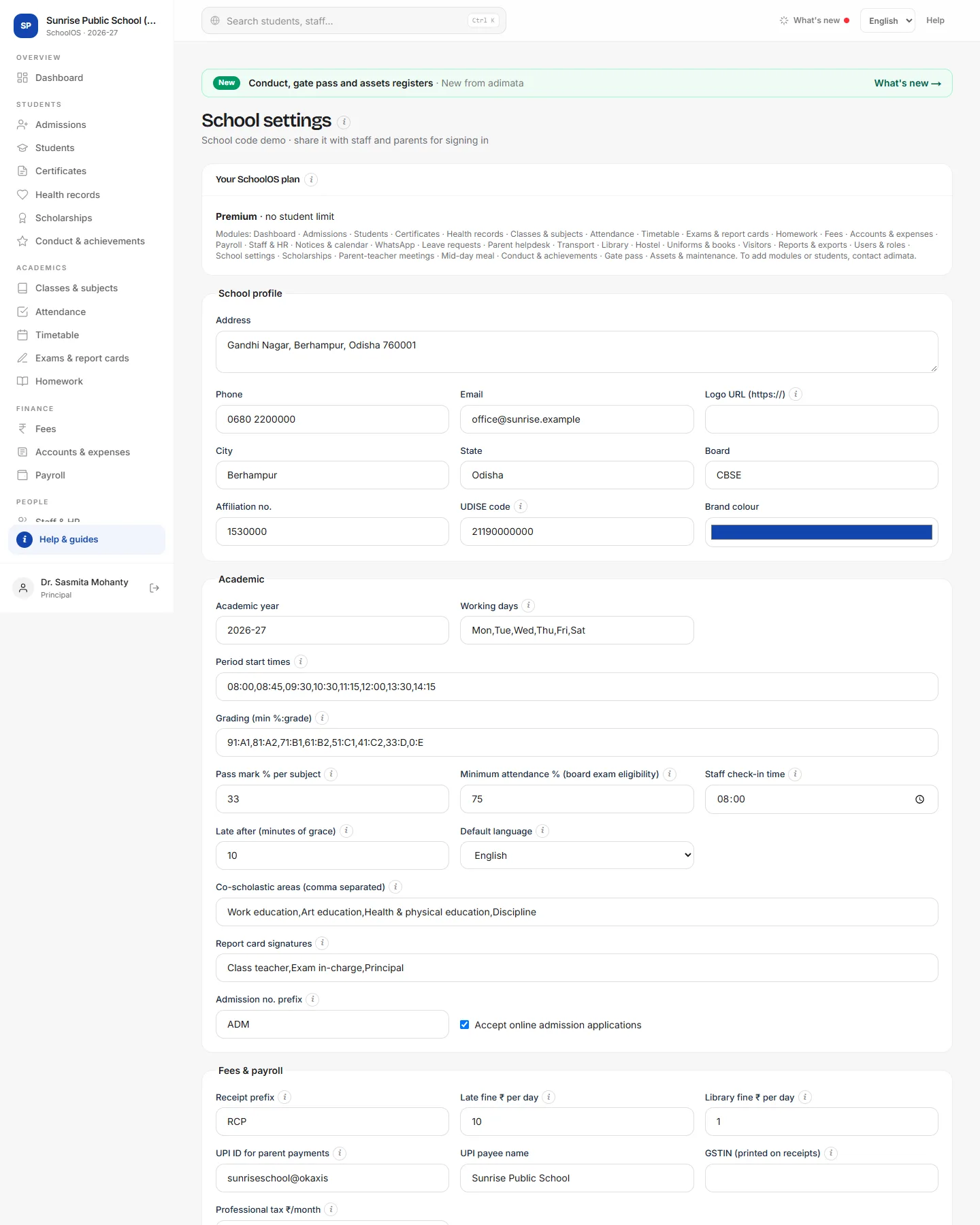
- 1Your planYour plan, student limit, renewal date and the modules switched on. To add a module or raise the limit, contact adimata.
- 2School profileAddress, Phone, Email, Logo URL (an https:// link to your logo image), City, State, Board, Affiliation no., UDISE code and Brand colour.
- 3AcademicThe rules the app uses every day.Step by step
- Academic year, for example 2026-27.
- Working days: Mon,Tue,Wed,Thu,Fri,Sat.
- Period start times: 08:00,08:45,… one time per period.
- Grading (min %:grade): 91:A1,81:A2,… and Pass mark % per subject.
- Minimum attendance % (board exam eligibility), Staff check-in time and Late after (minutes of grace).
- Default language, Co-scholastic areas, Report card signatures, Admission no. prefix, Accept online admission applications.
- 4Fees & payrollReceipt prefix, Late fine ₹ per day, Library fine ₹ per day, UPI ID for parent payments, UPI payee name, GSTIN (printed on receipts) and Professional tax ₹/month.
- 5WhatsApp wording and custom fieldsAbsence alert and Fee reminder text (keep {name} and {school}). Extra student fields and Extra staff fields, one per line: Label | text/number/date/select | options, for example House | select | Red, Blue, Green.
- 6SavePress Save settings.You should see: “Settings saved”, or a message naming the field to fix.
Common mistakes
- Period times with full stops or spaces: write 08:00,08:45 with commas.
Tips
- Settle working days and period times before building timetables.
- Custom fields appear under More details on every student or staff form.
Problems and questions
“UPI ID looks wrong”.
It must look like name@bank, for example school@okaxis.
“Logo must be an https:// link”.
Put the logo on your website or another public page and paste its https:// address.
“Grading must look like 91:A1,81:A2,…”.
Write minimum percent, colon, grade, separated by commas, highest first.