2 min read
Transfer, bonafide, character and 80C certificates
Every certificate gets its own number (for example TC/2026/0001), is kept in the list, and prints on the school letterhead with details from the student's record.
- Who can do this
- Office admin, principal
- You need
- Certificates module. Issuing needs Edit on Certificates; the Receptionist can only view.
- Not your job? Pick your role →
Before you start
- Student record complete: date of birth, parents' names, admission date, category, APAAR ID and PEN print on the TC.
- School address, affiliation number, UDISE code and logo in School settings.
Issuing a certificate
adimata.com/schoolos/app/certificates
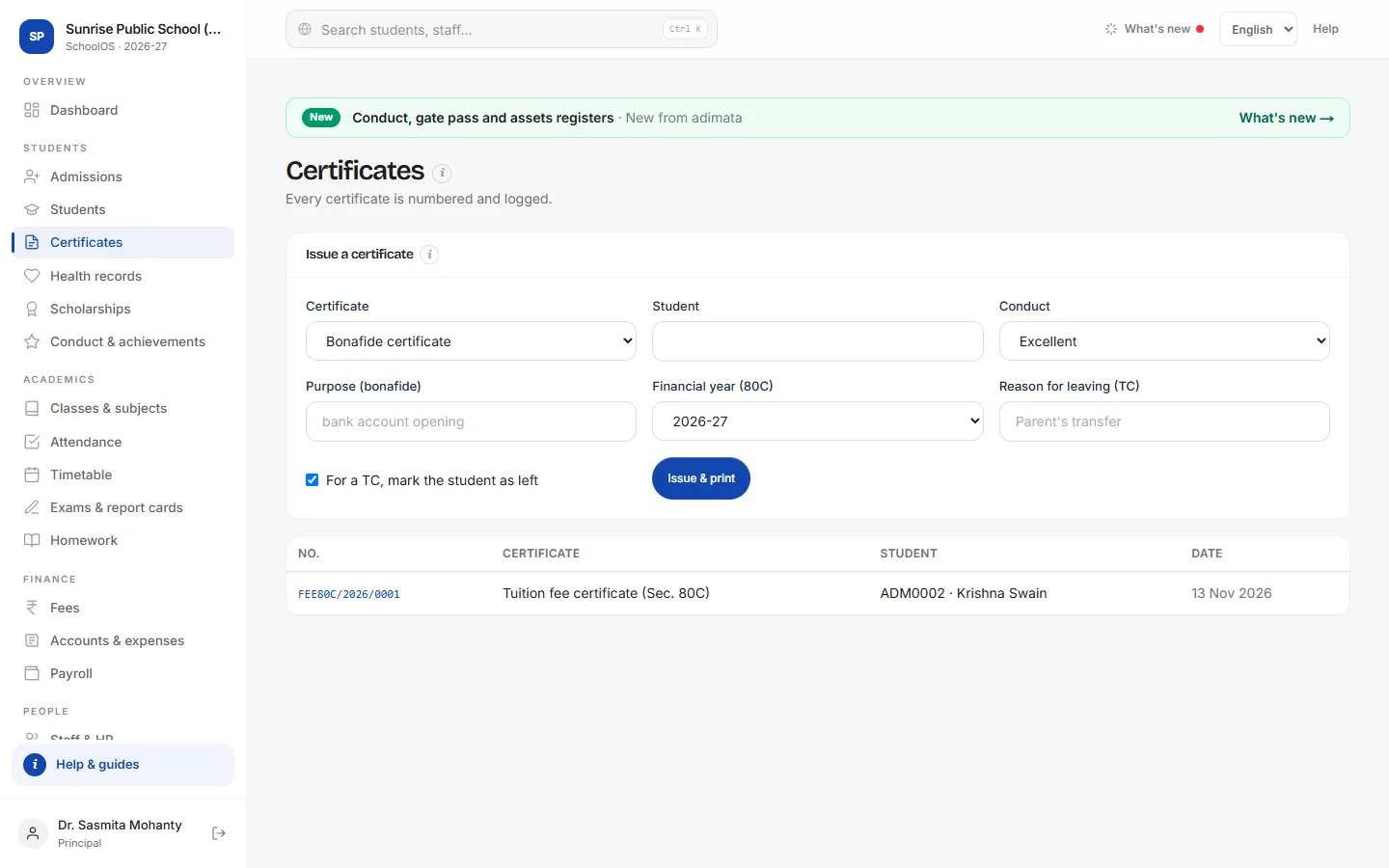
- 1Pick the certificate and studentCertificate: Transfer, Bonafide, Character or Tuition fee certificate (Sec. 80C). Student: type the admission number or name and pick. The Transfer / Bonafide / Character / Tuition buttons on a student's record open this form ready filled.
- 2Fill what this certificate usesEach certificate reads only its own fields.Step by step
- Bonafide: Purpose (bonafide), for example bank account opening.
- Character: Conduct.
- TC: Reason for leaving (TC) and Conduct; keep “For a TC, mark the student as left” ticked.
- 80C: Financial year (80C).
- 3Issue & printPress Issue & print, then Print.You should see: The certificate with its number and today's date.
- 4Reprint an old oneEvery certificate is listed below the form. Click its number to open and print it again.
Common mistakes
- Issuing a TC twice: each issue takes a new number. Reprint from the list instead.
- Unticking “mark the student as left” for a TC: the student stays active and keeps getting bills.
Tips
- The TC shows fee dues from the student's account: clear them first.
- The 80C certificate counts only fees whose name contains “tuition”.
- Sign and stamp the printout in the space for the principal's seal.
Problems and questions
The TC shows “–” for date of birth or mother's name.
Those fields are empty on the student record. Fill them, then issue again.
The 80C certificate shows ₹0.
No tuition fee was received in that financial year, or the fee names don't contain “tuition”.
Can I cancel a certificate?
No. Certificates stay in the log. Correct the record and issue a new one.